
There’s plenty of Guides on how Veeam uses S3 as a Repository. This blog is a great read.
But here’s the rub. What if you don’t really understand what you are doing, you set various immutability settings then try and get rid of your bucket. But you can’t as you need to delete all the objects. You can’t delete all the objects because some are immutable. And because Veeam scatters you’re data into millions of tiny blocks you can’t start to know where to look.
This is where challenge lies. Veeam doesn’t provide a simple way of reporting information back from your S3 bucket. The details around the blocks and written objects are buried deep in the internal database, and any S3 operations are costly and slow.
For example – you want to know what the Furthest retention date of your bucket. You can make an educated guess. If you have set 7 day retention, and you last wrote to the backup on the 1st of the month, you’d expect to be able to delete by the 8th of the month. But Veeam pads up to 10 days in order to reduce API calls (only an issue if you are using external S3 that charges for that). So you don’t really know. The ‘S3 API way’ is that you need to loop through all objects and read getobjectretention for each one keep going until you have them all and work out the max. If you have 10 million objects in your bucket that will take weeks and hammer your API calls.
So is there a better way? Yes, of course there is. The metadata about each Object is stored internally for fast access (in the case of Cloudian, this is in the Cassandra metadata database). But this information is not normally exposed – even via the admin API. Fortunately AWS came to the rescue with S3 Inventory. And since Cloudian is compatible with AWS, then this API is also supported. But being an on-prem alternative you can’t just upload your data in the Athena service or similar via a point and click web interface.
In short you need to write information about your bucket into another bucket and then analyze the information you get there. This is the PutBucketInventoryConfiguration, and in it’s simplest form we need to report on what’s in our bucket with also the addition of the object retention date.
aws s3api put-bucket-inventory-configuration --profile xxxxxx --endpoint-url https://s3.xxxx.com --bucket veeam --id daily-inventory --inventory-configuration '{ "Id": "daily-inventory", "IsEnabled": true, "Destination": {"S3BucketDestination": {"Bucket": "arn:aws:s3:::veeam-inv", "Format": "CSV" } }, "Schedule": { "Frequency": "Daily" }, "IncludedObjectVersions": "Current", "OptionalFields": ["ObjectLockRetainUntilDate"] }'
Key points to note:
- We are running the inventory against the veeam bucket
- It runs daily
- The inventory is written to 2nd bucket (veeam-inv) in the same account
- We are outputting in CSV format
- We need to include the ObjectLockRetainUntilDate field.
Leave that running for a day or 2 and your target bucket will hopefully be full of data
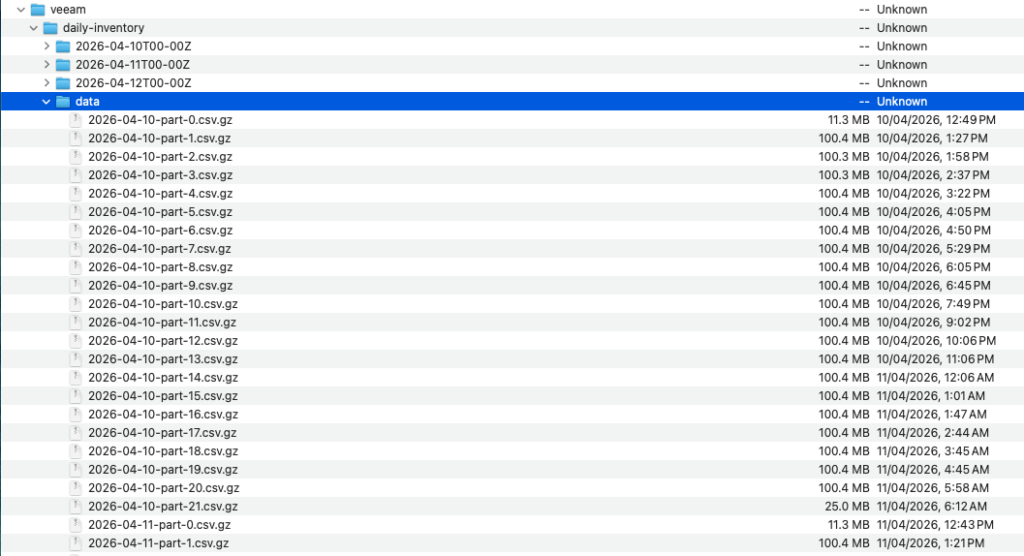
As you can see – in this instance which has several million objects, we get multiple 100MB files. This is where you are supposed to ingest that data into Athena for further processing. But hey this is AWS charging you for multiple copies of the data.
Best way to find out what is going on is just to download all the data for a day, combine into a single file and a couple of bash commands and you have the info you need
513 cat *.gz > all.csv
515 wc -l all.csv
526 cut -d"," -f 4 all.csv | tr -d \" | sort | uniq -c
Those commands combine all the files into one, count the total number of lines (objects) in that csv and the final one strips out the last column (Retention date), strips the quotes, then sorts and pipes through uniq. The -c gives the additional count to how many objects are being retained on each date.
In this case wc gives us 7.3million objects with the following Object lock distribution, 5 mil with no date set
Phils-MacBook-Air-1421:nano philsnowdon$ cut -d”,” -f 4 all.csv | tr -d \” | sort | uniq -c
5148039
1 2023-05-30T15:52:36Z
2 2023-06-09T16:04:22Z
5 2023-06-19T16:15:55Z
3 2023-06-29T16:27:34Z
4 2023-07-09T16:39:14Z
4 2023-07-19T16:50:45Z
1 2023-07-30T13:02:25Z
3 2023-08-29T13:37:19Z
12625 2023-09-08T13:48:51Z
32970 2023-09-18T14:00:24Z
762923 2023-09-28T14:13:07Z
3 2025-11-11T11:08:32Z
4 2025-12-22T11:11:45Z
2 2025-12-30T10:10:31Z
2 2025-12-31T09:10:11Z
9 2026-01-01T11:13:16Z
1 2026-01-09T10:43:05Z
4 2026-01-10T09:16:15Z
5 2026-01-11T17:13:24Z
3 2026-01-22T11:14:04Z
1 2026-02-01T11:16:21Z
57602 2026-02-19T10:07:59Z
29119 2026-02-20T19:14:08Z
31475 2026-02-21T21:46:29Z
65796 2026-03-01T10:10:00Z
46762 2026-03-02T22:30:35Z
64501 2026-03-04T11:15:17Z
107372 2026-03-12T02:27:15Z
24273 2026-03-13T00:44:09Z
33142 2026-03-14T15:00:21Z
53202 2026-03-22T10:10:01Z
47627 2026-03-23T09:15:38Z
71385 2026-03-25T11:16:36Z
115954 2026-04-01T12:42:12Z
24853 2026-04-02T12:43:43Z
38691 2026-04-04T12:46:39Z
107199 2026-04-11T12:57:19Z
40209 2026-04-12T12:58:55Z
218634 2026-04-14T13:02:23Z
83058 2026-04-21T13:14:28Z
102664 2026-04-23T09:48:07Z
So now we can remove the objects by adding a lifecycle policy to remove everything on the 24th April….
Then we can delete the inventory setting and delete the bucket